



引言
在软件产品交付场景中,授权管理是保障软件权益的重要手段。传统的硬编码时间限制方式存在修改麻烦、需重新部署等问题,而基于证书(License)的授权方式可通过替换证书文件实现灵活授权,无需改动源码。本文将详解如何基于 Spring Boot 自定义 Starter,并整合开源证书管理引擎 TrueLicense,实现对接口的证书授权拦截功能,帮助开发者快速搭建可控的授权体系。
一、技术背景与场景说明
1.1 什么是 TrueLicense?
TrueLicense 是一个基于 Java 的开源证书管理引擎,提供了证书的生成、颁发、验证等核心功能,支持通过密钥对加密证书内容,确保授权信息的安全性。其官网地址为:https://truelicense.java.net。
1.2 为什么需要自定义 Spring Boot Starter?
Spring Boot Starter 的核心作用是简化依赖管理和自动配置。通过自定义 Starter,我们可以将证书校验逻辑封装为独立组件,只需在目标项目中引入依赖并配置参数,即可快速集成证书授权功能,实现 "即插即用"。
1.3 核心场景
- 软件试用期授权:通过证书指定有效期,到期后自动限制使用。
- 硬件绑定授权:限制软件仅能在指定 MAC 地址的设备上运行。
- 接口级授权控制:对敏感接口添加证书校验,未授权请求直接拦截。
二、密钥对生成(基于 keytool)
证书的安全性依赖于非对称加密的密钥对(私钥用于生成证书,公钥用于验证证书)。我们使用 JDK 自带的keytool工具生成密钥对,步骤如下:
2.1 生成私钥库
私钥库用于存储生成证书的私钥,执行以下命令:
keytool -genkey -alias privatekey -keystore privateKeys.store -storepass "123456q" -keypass "123456q" -keysize 1024 -validity 3650参数说明:
-alias privatekey:私钥别名(后续生成证书需引用)。-keystore privateKeys.store:生成的私钥库文件名。-storepass "123456q":私钥库访问密码。-keypass "123456q":私钥本身的密码(建议与 storepass 一致,简化管理)。-keysize 1024:密钥长度(1024 位及以上确保安全性)。-validity 3650:私钥有效期(单位:天,此处为 10 年)。
执行后需输入所有者信息(如姓名、组织等),可根据实际情况填写。
2.2 导出公钥证书
从私钥库中导出公钥证书(用于校验证书的合法性):
keytool -export -alias privatekey -file certfile.cer -keystore privateKeys.store -storepass "123456q"参数说明:
-export:指定操作类型为导出证书。-file certfile.cer:导出的公钥证书文件名。
执行成功后,当前目录会生成certfile.cer公钥文件。
2.3 导入公钥到公钥库
将公钥证书导入公钥库(供应用程序验证证书时使用):
keytool -import -alias publiccert -file certfile.cer -keystore publicCerts.store -storepass "123456q"参数说明:
-alias publiccert:公钥在公钥库中的别名(后续校验需引用)。-keystore publicCerts.store:生成的公钥库文件名。
执行时需确认导入(输入yes),完成后公钥库publicCerts.store生成。
注意:私钥库(privateKeys.store)需妥善保管,公钥库(publicCerts.store)和公钥证书(certfile.cer)可随应用程序部署。
三、证书生成工具实现
基于 TrueLicense 的 API,我们可以通过代码生成证书文件。以下是核心实现步骤:
3.1 核心参数类定义
首先定义证书生成所需的参数封装类(LicenseCreatorParam):
/**
 * License证书生成类需要的参数
 * @author : jucunqi
 * @since : 2025/3/12
 */
@Data
public class LicenseCreatorParam implements Serializable {

    private static final long serialVersionUID = 2832129012982731724L;

    /**
     * 证书subject
     * */
    private String subject;

    /**
     * 密钥级别
     * */
    private String privateAlias;

    /**
     * 密钥密码(需要妥善保存,密钥不能让使用者知道)
    */
    private String keyPass;

    /**
     * 访问密钥库的密码
     * */
    private String storePass;

    /**
     * 证书生成路径
     * */
    private String licensePath;

    /**
     * 密钥库存储路径
     * */
    private String privateKeysStorePath;

    /**
     * 证书生效时间
     * */
    @JsonFormat(pattern = "yyyy-MM-dd HH:mm:ss", timezone = "GMT+8")
    private Date issuedTime = new Date();


    /**
     * 证书的失效时间
     * */
    @JsonFormat(pattern = "yyyy-MM-dd HH:mm:ss", timezone = "GMT+8")
    private Date expiryTime;

    /**
     * 用户的使用类型
     * */
    private String consumerType ="user";

    /**
     * 用户使用数量
     * */
    private Integer consumerAmount = 1;

    /**
     * 描述信息
     * */
    private String description = "";

    /**
     * 额外的服务器硬件校验信息(机器码)
     * */
    private LicenseCheckModel licenseCheckModel;
}
/**
* 自定义需要校验的参数
* @author : jucunqi
* @since : 2025/3/12
*/
@Data
public class LicenseCheckModel implements Serializable {
private static final long serialVersionUID = -2314678441082223148L;
/**
* 可被允许IP地址白名单
* */
private List<String> ipAddress;
/**
* 可被允许的MAC地址白名单(网络设备接口的物理地址,通常固化在网卡(Network Interface Card,NIC)的EEPROM(电可擦可编程只读存储器)中,具有全球唯一性。)
* */
private List<String> macAddress;
/**
* 可允许的CPU序列号
* */
private String cpuSerial;
/**
* 可允许的主板序列号(硬件序列化?)
* */
private String mainBoardSerial;
}3.2 证书生成器实现
实现LicenseCreator类,封装证书生成逻辑:
public class LicenseCreator {

    private final static X500Principal DEFAULT_HOLDER_AND_ISSUER = new X500Principal("CN=localhost, OU=localhost, O=localhost, L=SH, ST=SH, C=CN");
    private final LicenseCreatorParam param;

    public LicenseCreator(LicenseCreatorParam param) {
        this.param = param;
    }

    /**
     * 生成License证书
     * @return boolean
     */
    public boolean generateLicense(){
        try {
            LicenseManager licenseManager = new CustomLicenseManager(initLicenseParam());
            LicenseContent licenseContent = initLicenseContent();

            licenseManager.store(licenseContent,new File(param.getLicensePath()));

            return true;
        }catch (Exception e){
            throw new LicenseCreateException(MessageFormat.format("证书生成失败:{0}", param), e);
        }
    }

    /**
     * 初始化证书生成参数
     * @return de.schlichtherle.license.LicenseParam
     */
    private LicenseParam initLicenseParam(){
        Preferences preferences = Preferences.userNodeForPackage(LicenseCreator.class);

        //设置对证书内容加密的秘钥
        CipherParam cipherParam = new DefaultCipherParam(param.getStorePass());

        KeyStoreParam privateStoreParam = new CustomKeyStoreParam(LicenseCreator.class
                ,param.getPrivateKeysStorePath()
                ,param.getPrivateAlias()
                ,param.getStorePass()
                ,param.getKeyPass());

        return new DefaultLicenseParam(param.getSubject()
                ,preferences
                ,privateStoreParam
                ,cipherParam);
    }

    /**
     * 设置证书生成正文信息
     * @return de.schlichtherle.license.LicenseContent
     */
    private LicenseContent initLicenseContent(){
        LicenseContent licenseContent = new LicenseContent();
        licenseContent.setHolder(DEFAULT_HOLDER_AND_ISSUER);
        licenseContent.setIssuer(DEFAULT_HOLDER_AND_ISSUER);

        licenseContent.setSubject(param.getSubject());
        licenseContent.setIssued(param.getIssuedTime());
        licenseContent.setNotBefore(param.getIssuedTime());
        licenseContent.setNotAfter(param.getExpiryTime());
        licenseContent.setConsumerType(param.getConsumerType());
        licenseContent.setConsumerAmount(param.getConsumerAmount());
        licenseContent.setInfo(param.getDescription());

        //扩展校验服务器硬件信息
        licenseContent.setExtra(param.getLicenseCheckModel());

        return licenseContent;
    }
}
3.3 生成证书示例
通过单元测试或主方法生成证书:
public class LicenseCreateTest {
    public static void main(String[] args) {
        LicenseCreatorParam param = new LicenseCreatorParam();
        param.setSubject("your subject");
        param.setPrivateAlias("privatekey"); // 与私钥库中别名一致
        param.setKeyPass("123456q"); // 私钥密码
        param.setStorePass("123456q"); // 私钥库密码
        param.setLicensePath("your path"); // 证书输出路径
        param.setPrivateKeysStorePath("your path"); // 私钥库路径
        param.setIssuedTime(DateUtil.parseDate("2025-05-25")); // 生效时间
        param.setExpiryTime(DateUtil.parseDate("2025-09-01")); // 过期时间
        param.setConsumerType("your type");
        param.setConsumerAmount(1);
        param.setDescription("your desc");

        // 绑定MAC地址(仅允许指定设备使用)
        LicenseCheckModel checkModel = new LicenseCheckModel();
        checkModel.setMacAddressList(Collections.singletonList("8c:84:74:e7:62:a6"));
        param.setLicenseCheckModel(checkModel);

        // 生成证书
        LicenseCreator creator = new LicenseCreator(param);
        boolean result = creator.generateLicense();
        System.out.println("证书生成结果:" + (result ? "成功" : "失败"));
    }
}执行后,指定路径会生成your path.lic证书文件。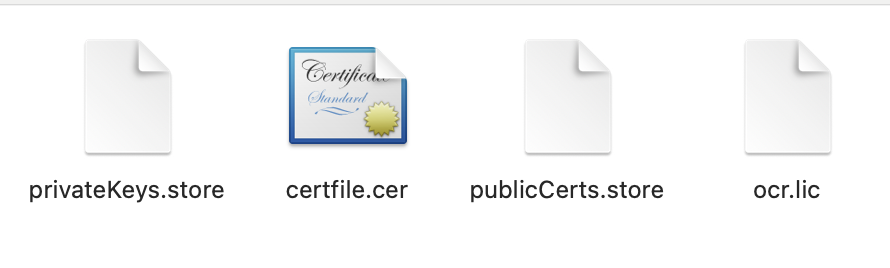
四、证书校验核心逻辑
应用程序需通过公钥库验证证书的合法性(有效期、设备绑定等),核心实现如下:
4.1 校验参数类定义
/**
 * license证书校验参数类
 * @author : jucunqi
 * @since : 2025/3/12
 */
@Data
public class LicenseVerifyParam {

    /**
     * 证书subject
     */
    private String subject;

    /**
     * 公钥别称
     */
    private String publicAlias;

    /**
     * 访问公钥库的密码
     */
    private String storePass;

    /**
     * 证书生成路径
     */
    private String licensePath;

    /**
     * 密钥库存储路径
     */
    private String publicKeysStorePath;

}
4.2 校验器实现
/**
 * license证书校验类
 * @author : jucunqi
 * @since : 2025/3/12
 */
@Slf4j
public class LicenseVerify {

    /**
     * 认证需要提供的参数
     */
    private final LicenseVerifyParam param;
    /**
     * 是否启用license
     */
    private final Boolean enableLicense;

    public LicenseVerify(LicenseVerifyParam param,Boolean enableLicense) {
        this.param = param;
        this.enableLicense = enableLicense;
    }

    /**
     * 安装License证书
     */
    public synchronized LicenseContent install(){

        log.info("服务启动,检查是否启用license验证,结果:" + enableLicense);
        if (!enableLicense) {
            return null;
        }
        LicenseContent result = null;
        DateFormat format = new SimpleDateFormat("yyyy-MM-dd HH:mm:ss");

        //1. 安装证书
        try{
            LicenseManager licenseManager = LicenseManagerHolder.getInstance(initLicenseParam(param));
            licenseManager.uninstall();

            result = licenseManager.install(new File(param.getLicensePath()));
            log.info(MessageFormat.format("证书安装成功,证书有效期:{0} - {1}",format.format(result.getNotBefore()),format.format(result.getNotAfter())));
        }catch (Exception e){
            log.error("证书安装失败!",e);
        }

        return result;
    }

    /**
     * 校验License证书
     * @return boolean
     */
    public boolean verify(){
        LicenseManager licenseManager = LicenseManagerHolder.getInstance(null);
        DateFormat format = new SimpleDateFormat("yyyy-MM-dd HH:mm:ss");

        //2. 校验证书
        try {
            LicenseContent licenseContent = licenseManager.verify();

            log.info(MessageFormat.format("证书校验通过,证书有效期:{0} - {1}",format.format(licenseContent.getNotBefore()),format.format(licenseContent.getNotAfter())));
            return true;
        }catch (Exception e){
            log.error("证书校验失败!",e);
            return false;
        }
    }

    /**
     * 初始化证书生成参数
     * @param param License校验类需要的参数
     * @return de.schlichtherle.license.LicenseParam
     */
    private LicenseParam initLicenseParam(LicenseVerifyParam param){
        Preferences preferences = Preferences.userNodeForPackage(LicenseVerify.class);

        CipherParam cipherParam = new DefaultCipherParam(param.getStorePass());

        KeyStoreParam publicStoreParam = new CustomKeyStoreParam(LicenseVerify.class
                ,param.getPublicKeysStorePath()
                ,param.getPublicAlias()
                ,param.getStorePass()
                ,null);

        return new DefaultLicenseParam(param.getSubject()
                ,preferences
                ,publicStoreParam
                ,cipherParam);
    }
}
五、Spring Boot Starter 自动配置
5.1 配置属性类
定义配置文件参数映射类,支持通过application.yml配置证书相关参数:
/**
 * 证书认证属性类
 *
 * @author : jucunqi
 * @since : 2025/3/12
 */
@Data
@ConfigurationProperties(prefix = "license")
public class LicenseConfigProperties {

    /**
     * 证书subject
     */
    private String subject;

    /**
     * 公钥别称
     */
    private String publicAlias;

    /**
     * 访问公钥库的密码
     */
    private String storePass;

    /**
     * 证书生成路径
     */
    private String licensePath;

    /**
     * 密钥库存储路径
     */
    private String publicKeysStorePath;

    /**
     * 是否启用license认证
     */
    private Boolean enableLicense;
}
5.2 自动配置类
通过@Configuration实现自动配置,注入校验器 Bean:
@Configuration
@AllArgsConstructor
@EnableConfigurationProperties(LicenseConfigProperties.class)
public class LicenseAutoConfiguration {

    private final LicenseConfigProperties licenseConfigProperties;

    // 注入LicenseVerify Bean,启动时执行install方法
    @Bean(initMethod = "install")
    public LicenseVerify licenseVerify() {
        LicenseVerifyParam param = new LicenseVerifyParam();
        param.setSubject(licenseConfigProperties.getSubject());
        param.setPublicAlias(licenseConfigProperties.getPublicAlias());
        param.setStorePass(licenseConfigProperties.getStorePass());
        param.setLicensePath(licenseConfigProperties.getLicensePath());
        param.setPublicKeysStorePath(licenseConfigProperties.getPublicKeysStorePath());
        return new LicenseVerify(param, licenseConfigProperties.getEnableLicense());
    }
}
5.3 AOP 拦截实现
通过自定义注解@RequireLicense和 AOP 拦截,实现接口级别的证书校验:
5.3.1 自定义注解
/**
 * 标记需要证书校验的接口方法
 */
@Target({ElementType.METHOD})
@Retention(RetentionPolicy.RUNTIME)
public @interface RequireLicense {
    boolean value() default true; // 是否启用校验(默认启用)
}
5.3.2 AOP 拦截逻辑
@Slf4j
@Aspect
@Component
public class RequireLicenseAspect {

    private final LicenseVerify licenseVerify;
    private final LicenseConfigProperties properties;

    public RequireLicenseAspect(LicenseVerify licenseVerify, LicenseConfigProperties properties) {
        this.licenseVerify = licenseVerify;
        this.properties = properties;
    }

    // 拦截所有添加@RequireLicense注解的方法
    @Around("@annotation(requireLicense)")
    public Object around(ProceedingJoinPoint point, RequireLicense requireLicense) throws Throwable {
        // 注解禁用校验或全局禁用校验,直接执行方法
        if (!requireLicense.value() || !properties.getEnableLicense()) {
            log.info("接口[{}]跳过证书校验", point.getSignature().getName());
            return point.proceed();
        }

        // 执行证书校验
        boolean verifyResult = licenseVerify.verify();
        if (verifyResult) {
            return point.proceed(); // 校验通过,执行原方法
        } else {
            throw new LicenseInterceptException("接口调用失败:证书未授权或已过期");
        }
    }
}
5.4 注册自动配置类
在src/main/resources/META-INF目录下创建spring.factories文件,指定自动配置类:
org.springframework.boot.autoconfigure.EnableAutoConfiguration=\
com.jcq.license.autoconfigure.LicenseAutoConfiguration,\
com.jcq.license.verify.aop.RequireLicenseAspect
六、Starter 打包配置
为确保其他项目引用 Starter 时能正常加载类,需修改pom.xml的构建配置:
<build>
    <plugins>
        <plugin>
            <groupId>org.springframework.boot</groupId>
            <artifactId>spring-boot-maven-plugin</artifactId>
            <!-- 跳过Spring Boot默认的可执行JAR打包(避免类路径嵌套在BOOT-INF下) -->
            <configuration>
                <skip>true</skip>
            </configuration>
        </plugin>
    </plugins>
</build>原因:默认情况下,Spring Boot 插件会将类打包到BOOT-INF/classes目录下,导致其他项目引用时无法通过常规类路径加载类。设置skip=true后,会生成标准的 JAR 包,类路径更友好。
七、使用示例
7.1 引入依赖
在目标项目的pom.xml中引入自定义 Starter:
<dependency>
    <groupId>com.jcq</groupId>
    <artifactId>license-spring-boot-starter</artifactId>
    <version>1.0.0</version>
</dependency>
7.2 配置参数
在application.yml中配置证书相关参数,配置时idea会弹出提示:
license:
  subject: 企业版软件授权证书
  public-alias: publiccert
  store-pass: 123456q
  license-path: classpath:license.lic # 证书文件存放路径
  public-keys-store-path: classpath:publicCerts.store # 公钥库路径
  enable-license: true # 启用证书校验
7.3 接口使用注解
在需要授权的接口方法上添加@RequireLicense注解:
@RestController
@RequestMapping("/api")
public class DemoController {

    @GetMapping("/sensitive")
    @RequireLicense // 需要证书校验
    public String sensitiveOperation() {
        return "敏感操作执行成功(已授权)";
    }

    @GetMapping("/public")
    @RequireLicense(false) // 禁用校验(即使全局启用也会跳过)
    public String publicOperation() {
        return "公开操作执行成功(无需授权)";
    }
}
八、总结
本文通过自定义 Spring Boot Starter 整合 TrueLicense,实现了一套灵活的证书授权方案,核心优势包括:
- 可插拔性:通过 Starter 封装,引入依赖即可使用,无需重复开发。
- 灵活性:支持全局开关和接口级开关,方便测试环境跳过校验。
- 安全性:基于非对称加密和硬件绑定,防止证书伪造和非法传播。
- 易维护:授权到期后只需替换证书文件,无需修改代码或重启服务。
实际项目中可根据需求扩展校验维度(如 CPU 序列号、内存大小等),进一步增强授权的安全性。
附录:核心类说明
| 类名 | 作用 |
|---|---|
| LicenseCreator | 证书生成工具类 |
| LicenseVerify | 证书校验核心类(启动校验 + 实时校验) |
| LicenseConfigProperties | 配置参数映射类 |
| LicenseAutoConfiguration | Starter 自动配置类 |
| RequireLicense | 接口校验注解 |
| RequireLicenseAspect | AOP 拦截器(实现接口级校验) |
完整源码可参考 GitHub 仓库:https://github.com/Jucunqi/license-spring-boot-starter.git(示例地址)。
评论 (0)